Component Reference
DriftVehicle
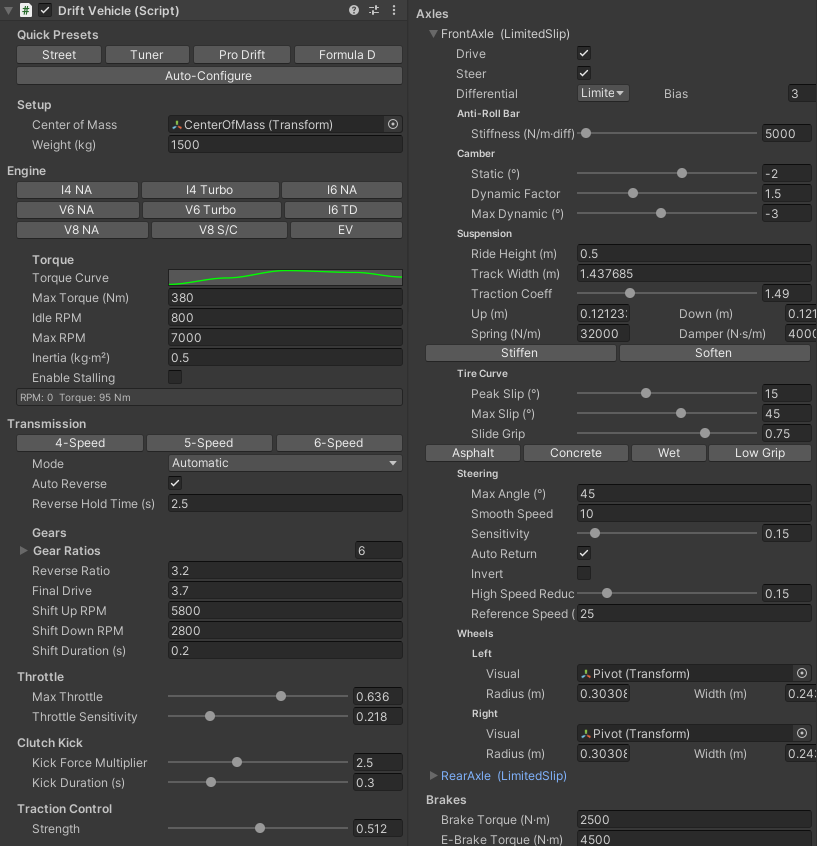
The main controller. Orchestrates engine, transmission, axles, brakes, clutch kick, traction control, and aerodynamics. Auto-discovers child DriftAxle components and adds a DriftInputSystem if no DriftInput exists.
Setup
| Property |
Description |
| Center of Mass |
Transform for rigidbody center of mass position (auto-created by wizard) |
Weight
| Property |
Description |
| Weight (kg) |
Vehicle mass in kilograms |
Drivetrain
| Property |
Description |
| Engine |
Serialized DriftEngine — torque curve, RPM limits, inertia |
| Transmission |
Serialized DriftTransmission — gear ratios, shift points |
| Transmission Mode |
Automatic or Manual |
Throttle
| Property |
Description |
| Max Throttle |
Clamps input throttle (0–1). Set to 0.3–0.5 for keyboard demos. |
| Throttle Sensitivity |
0–1. Lower values ramp throttle buildup slower on key hold. |
Clutch Kick
| Property |
Description |
| Clutch Kick Force |
Torque spike multiplier (1–5×) to break traction |
| Clutch Kick Duration |
How long the torque spike lasts (0.1–1s) |
Traction Control
| Property |
Description |
| Strength |
0–1. Reduces drive torque based on average axle slip. 0 = off, 1 = aggressive. |
Brakes & E-Brake
| Property |
Description |
| Brake Torque (N·m) |
Maximum brake torque applied per wheel |
| E-Brake Torque (N·m) |
Handbrake torque applied to non-steered axles |
Parking Hold
| Property |
Description |
| Parking Hold |
Auto-brake at low speed to prevent rolling |
| Speed Threshold (m/s) |
Speed below which parking hold engages |
| Hold Force (N) |
Force applied to hold the vehicle stationary |
Stationary Stabilizer
| Property |
Description |
| Enabled |
Toggle standstill jitter elimination |
| Speed Threshold (m/s) |
Speed below which stabilization engages (0.2 default) |
| Angular Threshold (rad/s) |
Angular velocity below which stabilization engages (0.3 default) |
| Grace Time (s) |
Time below the thresholds before engaging (0.2 default). Hysteresis prevents false triggers during slow drifts. |
| Blend Speed |
How fast stabilization blends in/out (6 default) |
While engaged, the stabilizer cancels gravity (true force equilibrium, so the suspension stops oscillating), damps residual velocity and angular velocity, and gently snaps the last epsilon to zero. Any input immediately releases it. It never activates above the thresholds or while airborne — drift feel is untouched.
Runtime Properties
| Property |
Description |
| IsStabilized |
Whether the vehicle is currently stabilized |
| StabilizeBlend |
0–1 blend of the stabilization force |
Aerodynamics
| Property |
Description |
| Drag Coefficient |
Air resistance multiplier: F = v² × dragCoeff × 0.5 |
| Downforce Coefficient |
Vertical grip force at speed: F_down = v² × downforceCoeff × 0.5 |
Axles
Child DriftAxle components are auto-discovered and displayed through the inspector.
Drive Presets
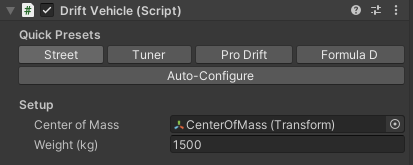
One-click buttons for vehicle-wide configuration:
| Preset |
Weight |
Engine |
Gears |
Suspension |
Diff |
TC |
| Street |
1,500 kg |
380 Nm I4 Turbo |
4.0 / 2.5 / 1.7 / 1.2 / 0.9 × 3.9 |
0.4m ride, 0.12m travel, 32k spring |
LSD 3.0 |
0.3 |
| Tuner |
1,200 kg |
500 Nm V6 NA |
3.5 / 2.2 / 1.6 / 1.2 / 0.9 × 4.3 |
0.35m ride, 0.1m travel, 28k spring |
LSD 4.0 |
0.2 |
| Pro Drift |
1,100 kg |
650 Nm V8 NA |
3.0 / 1.9 / 1.4 / 1.1 / 0.85 × 4.5 |
0.3m ride, 0.08m travel, 24k spring |
Locked |
0.1 |
| Formula D |
1,300 kg |
750 Nm V8 S/C |
2.8 / 1.8 / 1.3 / 1.0 / 0.8 × 5.0 |
0.25m ride, 0.08m travel, 30k spring |
Locked |
0.0 |
Surface Presets (per-axle quick buttons)
| Preset |
Peak Slip |
Max Slip |
Slide Grip |
| Asphalt |
15° |
45° |
0.75 |
| Polished Concrete |
12° |
35° |
0.65 |
| Wet |
10° |
30° |
0.55 |
| Low Grip |
25° |
60° |
0.40 |
Runtime Properties
| Property |
Description |
| currentSpeedMS |
Vehicle speed in m/s |
| DriftAngle |
Chassis slip angle in degrees |
| IsReverse |
Whether the vehicle is in reverse |
| clutchKickActive |
Whether a clutch kick is currently in progress |
DriftEngine
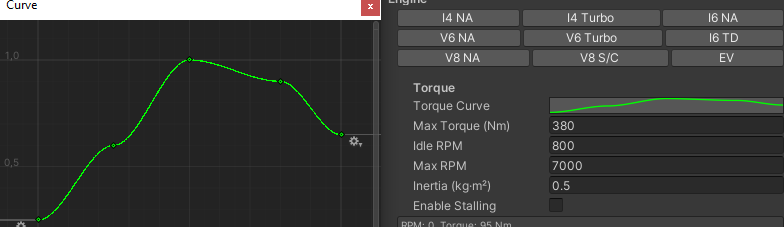
Serializable drivetrain class (not a MonoBehaviour). Configured inside the DriftVehicle inspector. Manages torque output, RPM calculation, and engine stalling.
| Property |
Description |
| Torque Curve |
Multiplier vs normalized RPM curve. Y = 0–1. |
| Max Torque (N·m) |
Peak engine torque |
| Idle RPM |
Engine idle speed |
| Max RPM |
Engine redline |
| Inertia (kg·m²) |
How quickly RPM responds to load changes |
| Enable Stalling |
When enabled, engine cuts out if RPM drops below stallRPM |
| Stall RPM |
RPM threshold for engine stall |
Engine Presets
| Preset |
Max Torque |
Max RPM |
Idle |
Character |
| I4 NA |
250 Nm |
7,500 |
850 |
High-revving, peaky |
| I4 Turbo |
380 Nm |
7,000 |
800 |
Broad torque, responsive |
| I6 NA |
400 Nm |
7,000 |
800 |
Smooth, linear |
| V6 NA |
500 Nm |
6,500 |
800 |
Torquey mid-range |
| V6 Turbo |
600 Nm |
6,500 |
750 |
Big torque, laggy |
| I6 TD |
550 Nm |
5,500 |
700 |
Diesel, low-end grunt |
| V8 NA |
650 Nm |
6,000 |
750 |
Classic muscle |
| V8 S/C |
750 Nm |
6,500 |
800 |
Supercharged, extreme |
DriftTransmission
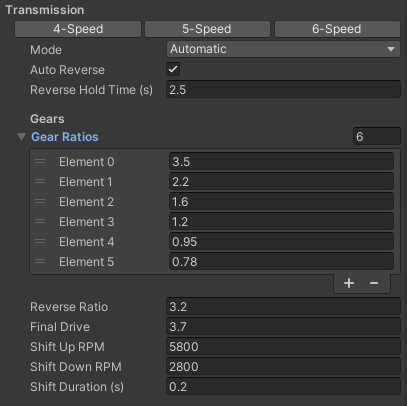
Serializable drivetrain class. Manages gear ratios, shift logic, and final drive.
| Property |
Description |
| Gear Ratios |
Array of forward gear ratios |
| Reverse Ratio |
Reverse gear ratio |
| Final Drive |
Differential/final drive ratio |
| Shift Up RPM |
Auto-transmission upshift threshold |
| Shift Down RPM |
Auto-transmission downshift threshold |
| Shift Duration (s) |
Time for gear change animation |
GetTotalRatio()
Returns gearRatios[currentGear] × finalDrive.
Shift Logic
- Upshift: when
engineRPM >= shiftUpRPM && throttle > 0.1f
- Downshift: when
engineRPM <= shiftDownRPM
- Duration: during shift, the new gear's ratio is used immediately for kinematic RPM calculation; engine rate-limits to the new target over
shiftDuration
DriftAxle
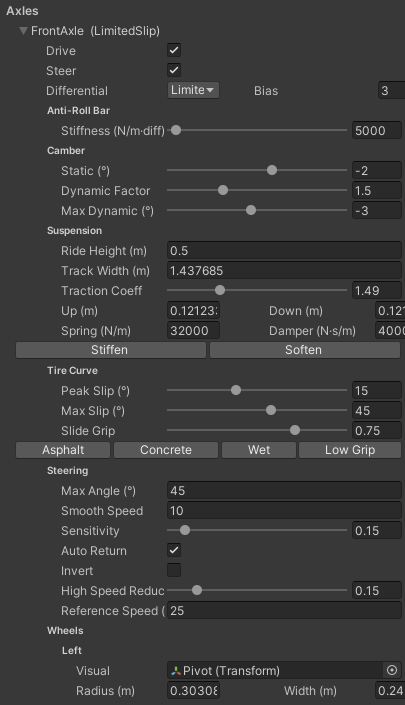
MonoBehaviour. Represents one axle with two wheels, suspension, camber, tire curve, steering, differential, and anti-roll bar. Each wheel has independent suspension travel (compression/droop).
Configuration
| Property |
Description |
| isDrive |
Axle receives engine torque |
| isSteerable |
Wheels on this axle respond to steering input |
Suspension
| Property |
Description |
| Ride Height (m) |
Distance from axle center to wheel center at rest |
| Travel Up (m) |
Maximum compression travel from rest (bump) |
| Travel Down (m) |
Maximum droop travel from rest |
| Spring Rate (N/m) |
Suspension stiffness |
| Damper Rate (N·s/m) |
Suspension damping |
Camber
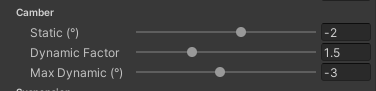
| Property |
Range |
Description |
| Static Camber |
-12° to +5° |
Wheel tilt at rest. Negative = tops lean inward. Default -1.5°. |
| Dynamic Camber Factor |
0 to 5 |
How much body roll adds camber. Higher = more aggressive response. |
| Max Dynamic Camber |
-10° to +5° |
Clamp on the total dynamic camber contribution. |
Camber Formula:
visualCamber = staticCamber + (isLeft ? 1 : -1) × dynamicContribution
- Left wheels use
camberAngle directly; right wheels use -camberAngle (because right-side negative camber tilts tops inward too, just mirrored)
- Dynamic contribution pushes the outside wheel more negative (good for turn-in) and inside wheel toward positive (reduces edge digging)
- Excessive camber (beyond ~3°) applies a grip penalty — lateral force is reduced proportionally
- Camber thrust generates a small lateral force toward the lean direction, aiding turn-in
Wheels
| Property |
Description |
| Left Wheel |
DriftWheel reference |
| Right Wheel |
DriftWheel reference |
| Track Width (m) |
Distance between left and right wheel centers |
| Traction Coefficient |
Friction multiplier (0.1–5). Higher = more grip. |
Tire Curve
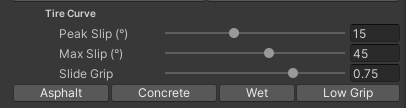
| Property |
Range |
Description |
| Peak Slip Angle |
3°–35° |
Slip angle at which lateral force peaks. Default 15° asphalt. |
| Max Slip Angle |
10°–70° |
Slip angle where grip stops falling. Default 45°. |
| Slide Grip Ratio |
0.1–1 |
Fraction of peak grip retained in full slide. Default 0.75. |
| Deadband (°) |
0–2 |
Slip angle below which lateral force is exactly zero. Kills standstill jitter from sign flicker. Default 0.5°. |
| Relaxation (m) |
Distance the tire must roll before lateral force fully builds. Higher = more lag. |
| Friction Circle Sat |
0–1 |
How much longitudinal force eats into lateral grip. 0 = no interaction. |
Tire Curve Model:
|slip| <= peakSlipAngle        → linear climb to peak
peak < |slip| <= maxSlipAngle  → lerp from peak down to slideGripRatio × peak
|slip| > maxSlipAngle          → flat at slideGripRatio × peak
Steering
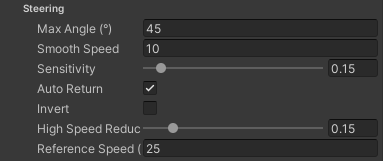
| Property |
Description |
| Max Steer Angle (°) |
Maximum steering angle |
| Steer Smooth Speed |
Base response speed for steering |
| Sensitivity |
0–2. Multiplier on steering response |
| Auto Return |
Steering returns to center when input released |
| Invert Steer |
Flip steering direction |
| High Speed Reduction |
0–1. Reduces steering angle at speed |
| Reference Speed (m/s) |
Speed at which reduction reaches full effect |
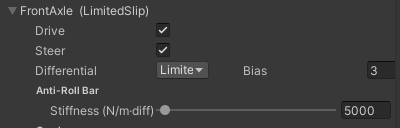
Differential
| Property |
Description |
| Differential |
Open, Locked, or LimitedSlip |
| Lock Bias |
Torque bias ratio for LSD (1–5). Higher = more locking. |
| Type |
Behavior |
| Open |
Both wheels same torque, limited by wheel with LESS traction |
| Locked |
Each wheel gets independent torque based on its own traction limit |
| LimitedSlip |
Applies Torque Bias Ratio. When one wheel exceeds traction, excess torque transfers to the other up to lockBias limit |
Anti-Roll Bar
| Property |
Description |
| Stiffness (N/m·diff) |
0–200,000. Transfers load between wheels to resist body roll. Higher = stiffer. |
Tuning:
| Value | Effect |
|-------|--------|
| 0 | Off |
| 5,000–15,000 | Typical drift range |
| 15,000–50,000 | Aggressive |
| 50,000+ | Extreme — may lift inside wheel |
- Stiffer front bar → more understeer
- Stiffer rear bar → more oversteer
Static Friction Hold
| Property |
Description |
| Enabled |
Toggle the banked-slope hold |
| Coefficient |
Static friction multiplier on the axle's normal load (default 1.8). Higher = grips steeper banks. Physical limit ≈ atan(coefficient), e.g. 1.8 holds up to ~61°. |
| Speed Threshold (m/s) |
Speed below which the hold is active (default 0.5). Above this, normal slip-based grip takes over. |
| Max Slope (°) |
Maximum bank angle the hold supports. Beyond this the vehicle slides realistically. 0 = no limit. |
When the vehicle is near-stationary, each axle counters its load share of gravity's component along the ground plane (computed from the wheel-cast surface normals), clamped to coefficient × springLoad. This keeps the vehicle planted on banked slopes without affecting drift behavior above the speed threshold.
Runtime Properties
| Property |
Description |
| CurrentSteerAngle |
Current smoothed steering angle |
| CurrentArticulation |
Axle roll angle (difference between left/right ground heights) |
| CurrentSlip |
Axle-level forward slip (0 = full grip) |
| CurrentSlipAngle |
Current slip angle in degrees |
| CurrentCamberAngle |
Combined static + dynamic camber |
| CurrentAntiRollForce |
Current anti-roll bar force |
DriftWheel
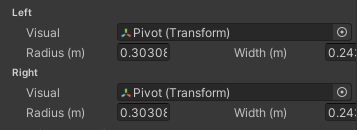
MonoBehaviour on each wheel GameObject. Handles wheel visual positioning, spin rotation, steering rotation, and camber. No collider — all ground interaction is handled by the parent DriftAxle's raycast.
| Property |
Description |
| Wheel Visual |
The visual mesh transform |
| Wheel Radius (m) |
Radius of the wheel mesh |
| Wheel Width (m) |
Width of the wheel contact patch |
Runtime Properties
| Property |
Description |
| WheelRPM |
Computed from vehicle speed |
| IsGrounded |
Whether the wheel's side of the axle is in contact |
| Compression |
Current suspension compression (0 = droop, 1 = bump stop) |
| IsSteerable |
Whether the wheel is on a steerable axle |
Visual Rotation
finalRotation = steerRotation × camberRotation × spinRotation
- Left wheel uses
camberAngle, right wheel uses -camberAngle
- Steer rotation only applies if parent axle is steerable
DriftEffects
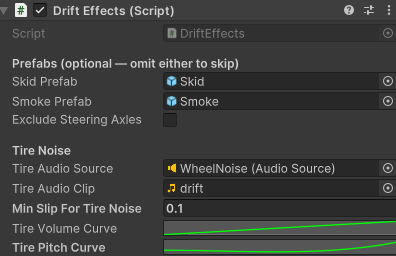
Per-wheel visual and audio effects based on tire slip. Spawns prefabs per wheel for skid marks and smoke, and plays tire screech audio.
Prefabs
| Property |
Description |
| Skid Prefab |
GameObject with TrailRenderer — spawned at each wheel |
| Smoke Prefab |
GameObject with ParticleSystem — spawned at each wheel |
| Exclude Steering Axles |
Check to skip effects on steerable axles (rear-only skid/smoke) |
Both prefabs are optional. If a slot is null, that effect is skipped. The DriftWheelEffects component is auto-added to spawned instances.
Tire Noise
| Property |
Description |
| Tire Audio Source |
AudioSource for tire screech. Auto-created if null but clip is assigned. |
| Tire Audio Clip |
Clip to play during slip |
| Min Slip For Noise |
Threshold to trigger tire noise (0.2 default) |
| Cooldown |
Time before noise can restart after stopping |
| Volume Curve |
Volume vs normalized slip |
| Pitch Curve |
Pitch vs normalized slip |
How It Works
On Start(), one instance of each prefab is spawned per wheel (filtered by excludeSteeringAxles). Each frame, DriftEffects raycasts from each wheel center to find the ground contact point, calculates combined lateral + longitudinal slip, then updates each prefab instance's position and slip value.
DriftWheelEffects
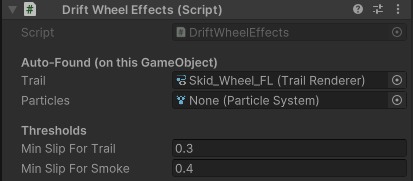
Auto-added to spawned effect prefabs. Finds TrailRenderer and ParticleSystem on the same GameObject and controls them by slip.
| Property |
Description |
| Trail |
Auto-found TrailRenderer |
| Particles |
Auto-found ParticleSystem |
| Min Slip For Trail |
Slip threshold to enable trail emission (0.3 default) |
| Min Slip For Smoke |
Slip threshold to enable particle emission (0.4 default) |
The component only toggles emission on/off — all visual properties (trail width, particle rate, colors) are whatever you configure directly on the prefab.
DriftAudio
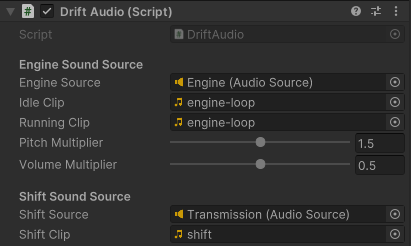
Engine and shift audio system. Blends pitch and volume of an engine AudioSource by RPM. If no AudioSource is assigned, one is auto-created on the same GameObject.
| Property |
Description |
| Engine Source |
AudioSource to drive with RPM. Falls back to auto-created source. |
| Idle Clip |
AudioClip for engine at idle/low RPM |
| Running Clip |
AudioClip for engine at high RPM |
| Pitch Multiplier |
Overall pitch multiplier |
| Volume Multiplier |
Overall volume multiplier |
Volume Behavior
- Engine volume has a minimum floor of 0.15 at idle so it's always audible
- Volume scales to 1.0 at max RPM
- An AudioSource is auto-created with
spatialBlend = 1 (3D) if none exists
Shift Sound
| Property |
Description |
| Shift Source |
AudioSource for gear change sounds |
| Shift Clip |
AudioClip played on each gear shift |
DriftState
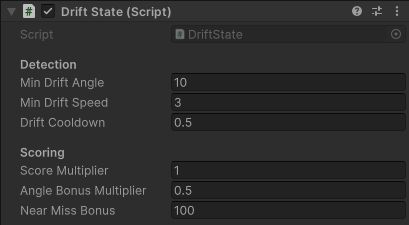
Drift scoring and detection system. Tracks chassis slip angle, countersteering, and accumulates score.
Detection
| Property |
Description |
| Min Drift Angle (°) |
Minimum slip angle to register a drift (10° default) |
| Min Drift Speed (m/s) |
Minimum speed for drift detection (3 m/s default) |
| Drift Cooldown (s) |
Time before a new drift can begin after ending (0.5s default) |
Scoring
| Property |
Description |
| Score Multiplier |
Global multiplier on all scoring |
| Angle Bonus Multiplier |
Extra multiplier for high-angle drifts |
| Near Miss Bonus |
Bonus points for near-miss events |
Runtime Properties
| Property |
Description |
| IsDrifting |
Whether a drift is currently active |
| CurrentDriftAngle |
Current chassis slip angle |
| DriftDuration |
How long the current drift has lasted |
| DriftScore |
Total accumulated score |
| RunningScore |
Score accumulating in the current drift |
| MaxDriftAngle |
Maximum angle reached in current drift |
| DriftCount |
Number of drifts completed |
| IsCountersteering |
Whether the driver is countersteering |
DriftCameraController
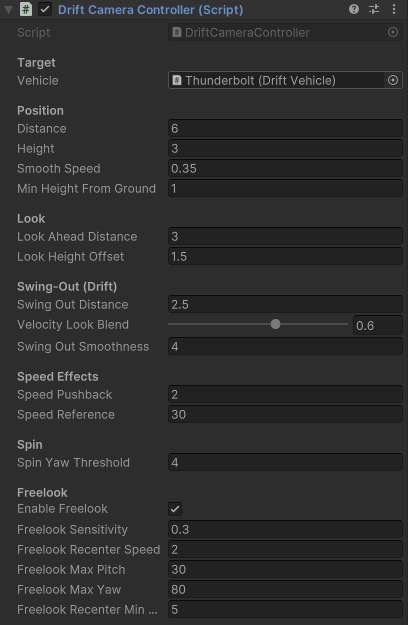
Drift-aware chase camera with velocity-based look-ahead and lateral swing-out during drifts.
Position
| Property |
Description |
| Vehicle |
DriftVehicle reference |
| Distance (m) |
Base follow distance |
| Height (m) |
Height offset above target |
| Smooth Speed |
SmoothDamp time constant |
| Min Height From Ground (m) |
Camera rises to avoid ground penetration |
Look
| Property |
Description |
| Look Ahead Distance (m) |
How far ahead the camera looks |
| Look Height Offset (m) |
Vertical look offset |
Swing-Out (Drift)
| Property |
Description |
| Swing-Out Distance (m) |
Lateral offset during drifts (2.5 default) |
| Velocity Look Blend |
0–1. Blends look direction between car forward and velocity direction |
| Swing-Out Smoothness |
Smoothness of swing-out motion |
Speed Effects
| Property |
Description |
| Speed Pushback (m) |
Extra distance pushed back at high speed |
| Speed Reference (m/s) |
Speed at which pushback reaches full effect |
Spin
| Property |
Description |
| Spin Yaw Threshold |
Yaw rate (rad/s) at which camera stops looking ahead and focuses on car |
Freelook
| Property |
Description |
| Enable Freelook |
Toggle mouse freelook |
| Sensitivity |
Mouse look sensitivity |
| Recenter Speed |
How fast camera recenters when driving |
| Max Pitch / Max Yaw |
Look angle limits |
| Recenter Min Speed |
Speed above which freelook recenters |
DriftCameraManager
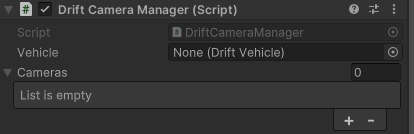
Multi-camera switcher. Cycles through a list of cameras with the CameraSwitch input.
| Property |
Description |
| Vehicle |
DriftVehicle reference (provides input) |
| Cameras |
List of Camera objects to cycle through |
DriftLightManager
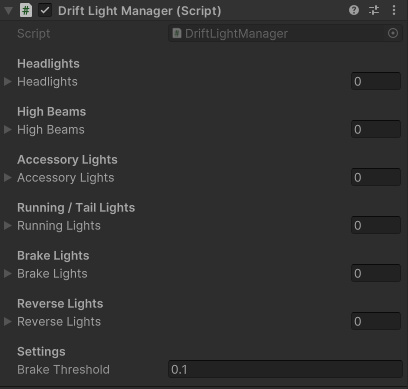
Controls a 4-state lighting cycle: Off → Main → HighBeam → Accessories → Off.
| Property |
Description |
| Headlights |
List of Light objects for low-beam headlights |
| High Beams |
List of Light objects for high-beams |
| Accessory Lights |
List of Light objects (light bars, etc.) |
| Running / Tail Lights |
Enabled whenever lights are on (state >= Main) |
| Brake Lights |
Auto-enabled when braking |
| Reverse Lights |
Auto-enabled when reversing |
| Brake Threshold |
Minimum brake input to trigger brake lights |
Light States
| State |
Headlights |
High Beams |
Accessories |
Running |
| Off |
off |
off |
off |
off |
| Main |
on |
off |
off |
on |
| HighBeam |
on |
on |
off |
on |
| Accessories |
on |
off |
on |
on |
DriftInfo
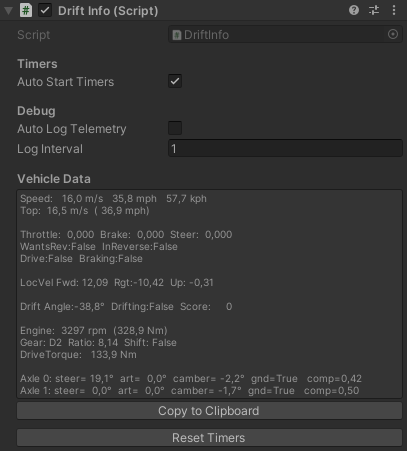
Runtime telemetry data. Populates live values every frame for display in the custom DriftInfoEditor.
| Property |
Description |
| Auto Start Timers |
Begin 0–60 / 0–100 timers on Start |
| Auto Log Telemetry |
Periodically log telemetry to console |
| Log Interval |
Seconds between automatic logs |
Available Telemetry
- Speed (m/s, MPH, KPH) with top speed tracking
- Throttle / Brake / Steer
- Engine RPM and torque
- Current gear, shift status, reverse state
- Drive torque and total ratio
- Per-axle articulation, ground contact, compression, steer angle, lateral force, camber
- Local velocity breakdown (forward, right, up)
- Drift angle and scoring (via DriftState)
DriftInputSystem
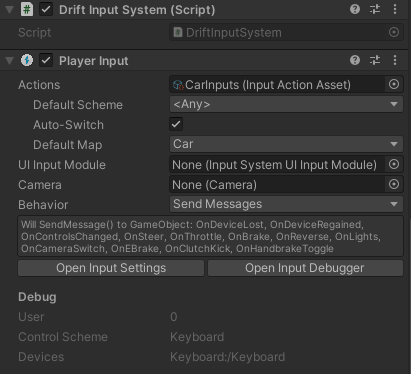
New Input System implementation. Requires the com.unity.inputsystem package. Auto-added by DriftVehicle.Awake() if no DriftInput component exists.
Reads from a PlayerInput component with action map Car containing:
| Action |
Type |
| Steer |
Value / Axis |
| Throttle |
Value / Axis |
| Brake |
Value / Axis |
| EBrake |
Button |
| ClutchKick |
Button |
| Reverse |
Button |
| Lights |
Button |
| CameraSwitch |
Button |
| HandbrakeToggle |
Button |
DriftInputDelegate
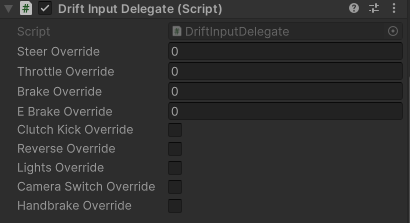
Programmatic input module. Overrides all inputs from code — useful for AI, testing, or networked vehicles.
| Property |
Description |
| steerOverride |
-1 to 1 |
| throttleOverride |
0 to 1 |
| brakeOverride |
0 to 1 |
| eBrakeOverride |
0 to 1 |
| clutchKickOverride |
Bool |
| reverseOverride |
Bool |
| lightsOverride |
Bool |
| cameraSwitchOverride |
Bool |
| handbrakeToggleOverride |
Bool |
 Dylan Auty