 Dylan Auty
 Simple Ocean
Infinite, performant ocean rendering for Unity — with quadtree LOD, Gerstner waves, buoyancy physics, URP & Built-in support, underwater fog, and caustics.
Full documentation: https://dylanauty.com/documentation/simple-ocean/
Quick Start
1. Add Ocean To Scene
Tools > Simple Ocean > Add Ocean To Scene
Creates a GameObject with OceanRenderer using the "Shallows" wave preset. Assign a material (SimpleOceanURP or SimpleOceanBuiltIn) to the Ocean Material slot.
2. Add Underwater Effect
Select your camera and add the UnderwaterEffect component (or assign the material and press Play — underwater fog activates when the camera submerges).
3. Add Buoyancy (optional)
Select a GameObject with a Rigidbody, then Tools > Simple Ocean > Add Buoyancy To Selection.
Pipeline Support
Built-In Render Pipeline
- Use
SimpleOceanBuiltInmaterial - Underwater fog sets
RenderSettings.fogwhile submerged, restores on exit - Caustics render via
OnRenderImageon the camera
URP (Universal Render Pipeline)
- Use
SimpleOceanURPmaterial - Underwater fog + caustics combined in a single
ScriptableRenderPassusingHidden/UnderwaterEffectURP - The pass is injected automatically at runtime — no manual renderer feature setup needed
- URP 12+ (tested on 14.x)
Both pipelines support vertex displacement, analytical normals, refraction, depth-based fog, shore foam, crest foam, SSS, and intersection rings.
Components
OceanRenderer
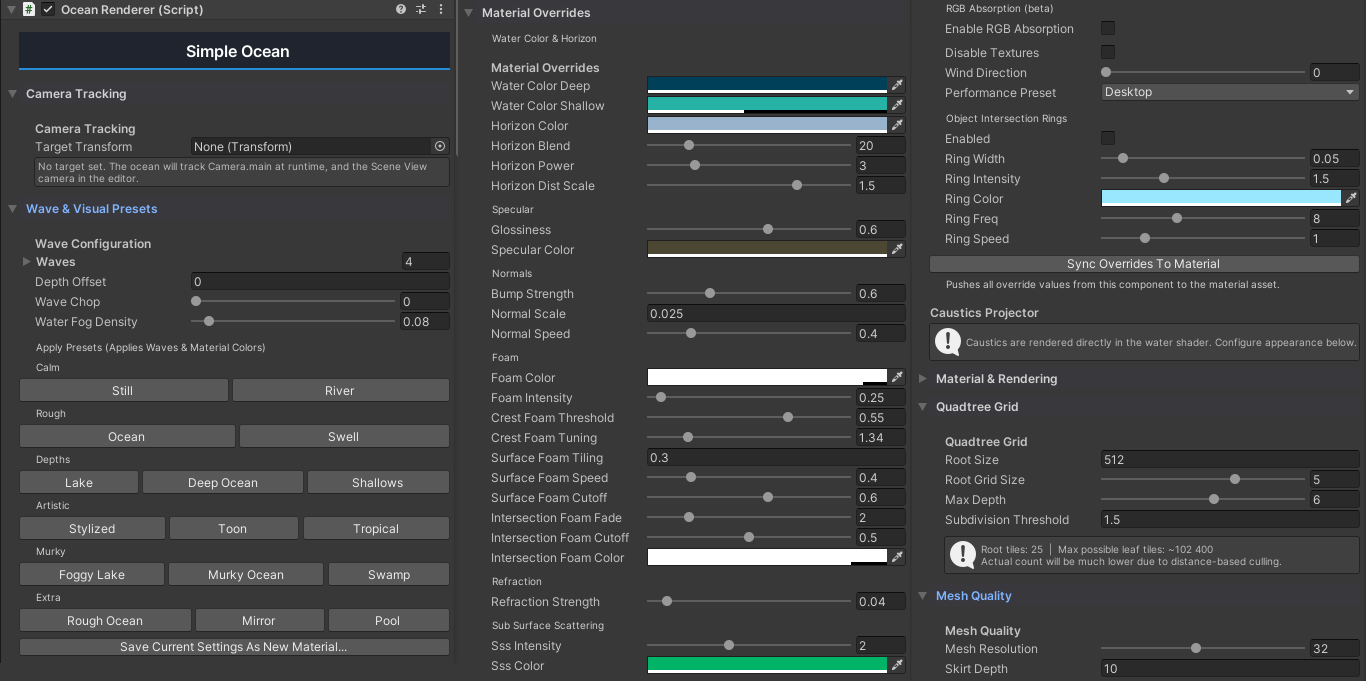
The core component on the ocean GameObject. Controls the quadtree grid, wave configuration, material properties, and mesh quality.
| Section | Fields |
|---|---|
| Camera Tracking | Target Transform — the transform the ocean grid follows (default: active camera) |
| Wave Configuration | 4 Gerstner waves (Wavelength, Amplitude, Speed, Steepness, Direction), Depth Offset, Wave Chop, Water Fog Density |
| Material Overrides | Water Color Deep, Water Color Shallow, Horizon Color, Horizon Blend, Horizon Power, Horizon Dist Scale, Glossiness, Specular Color, Bump Strength, Normal Scale, Normal Speed, Foam Color, Foam Intensity, Crest Foam Threshold, Crest Foam Tuning, Surface Foam Tiling/Speed/Cutoff/Distortion, Intersection Foam Tiling/Speed/Distortion/Fade/Cutoff/Color, Refraction Strength, SSS Intensity/Color/Power/Crest Scale/Distortion, Disable Textures, Enable RGB Absorption, Absorption R/G/B, Wind Direction, Performance Preset, Ring Width/Intensity/Color/Freq/Speed, Shore Foam Intensity, Foam Fade Range, Enable Rings |
| Material & Rendering | Ocean Material, Layer, Cast Shadows, Receive Shadows |
| Quadtree Grid | Root Size (world-space extent), Root Grid Size (1–7, must be odd), Max Depth (1–10), Subdivision Threshold |
| Mesh Quality | Mesh Resolution (4–64 verts per tile edge), Skirt Depth (hides LOD seams) |
| Debug Tools | Debug Mode with pass isolation (0=SurfaceFoam…6=Rings), Pause Waves |
| Addons | Add Caustics Projector Component button |
Wave presets are applied via the Wave & Visual Presets section using preset buttons — see Wave Presets.
UnderwaterEffect
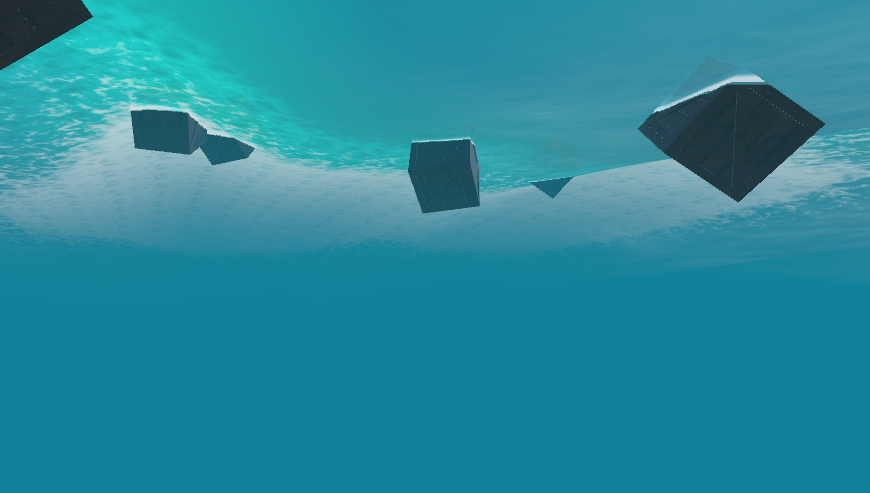
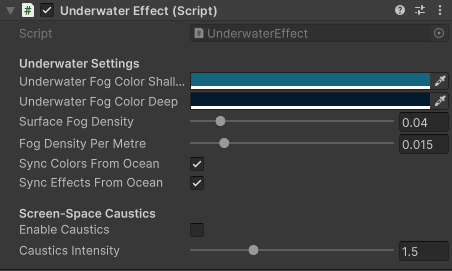
Attach to your camera. Controls underwater fog and screen-space caustics. Activates when the camera position is below the water surface.
| Field | Description |
|---|---|
| Underwater Fog Color Shallow | Fog color at the water surface (blends toward deep color as you descend) |
| Underwater Fog Color Deep | Deep water fog color |
| Surface Fog Density | Base fog density at the surface (0.001–0.3) |
| Fog Density Per Metre | Extra fog density added per metre below the surface (0.0–0.1) |
| Sync Colors From Ocean | Auto-pull fog colors from the ocean material's _WaterColorShallow / _WaterColorDeep (default: on) |
| Sync Effects From Ocean | Auto-pull caustics intensity from the ocean material (default: on) |
| Enable Caustics | Master toggle for screen-space caustics (default: off) |
| Caustics Intensity | Brightness multiplier for caustics (0–5) |
Built-in: Fog modifies RenderSettings.fog while underwater and restores on exit. Caustics render through OnRenderImage.
URP: Fog and caustics combined in a single ScriptableRenderPass using Hidden/UnderwaterEffectURP, injected at AfterRenderingPostProcessing.
WaterBuoyancy
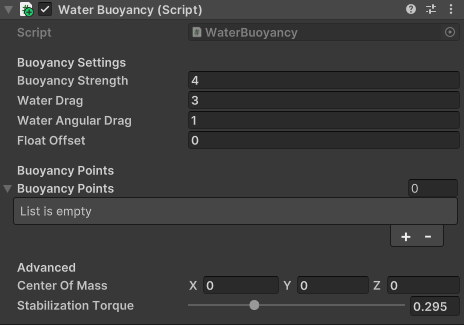
Attach to any GameObject with a Rigidbody to make it float on the ocean surface.
| Field | Description |
|---|---|
| Buoyancy Strength | Upward force multiplier |
| Water Drag | Linear drag applied while submerged |
| Water Angular Drag | Angular drag while submerged |
| Float Offset | Vertical offset for the waterline |
| Buoyancy Points | Custom sample points; uses bounding-box corners if empty |
| Center Of Mass | Local-space center of mass offset (zero = no override) |
| Stabilization Torque | Extra torque resisting rotation while submerged (0 = free rotation, 1 = locked upright) |
CausticsProjector
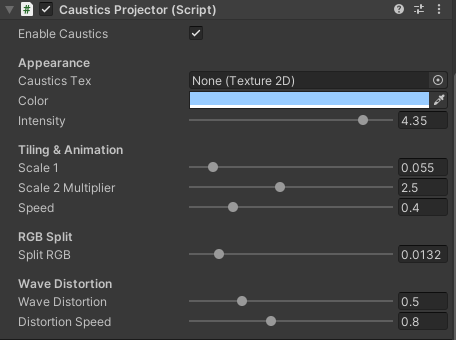
Attached to the ocean GameObject via the Add Caustics Projector Component button in the OceanRenderer inspector. Controls caustics on the water surface and screen-space caustics on underwater objects.
| Field | Description |
|---|---|
| Caustics Tex | Caustics texture (defaults to Assets/SimpleOcean/Textures/caustics.gif) |
| Color | Tint color |
| Intensity | Brightness multiplier (0–5) |
| Scale 1 | World-space scale of the caustics pattern (0.005–0.5; smaller = larger pattern) |
| Scale 2 Multiplier | Second-layer scale multiplier (0.5–5) |
| Speed | Animation speed of the caustics movement (0–2) |
| Split RGB | Colour-channel offset for chromatic aberration (0–0.1) |
| Wave Distortion | How much the pattern is warped by simulated refraction (0–2) |
| Distortion Speed | Speed of the distortion animation (0–2) |
| Enable Caustics | Master toggle |
When enabled: pushes all caustics properties to the ocean material each frame via LateUpdate, and temporarily enables UnderwaterEffect.enableCaustics during its OnEnable. When disabled or removed, restores the underwater effect's previous caustics state and sets _CausticsToggle to 0 on the ocean material.
IslandGenerator
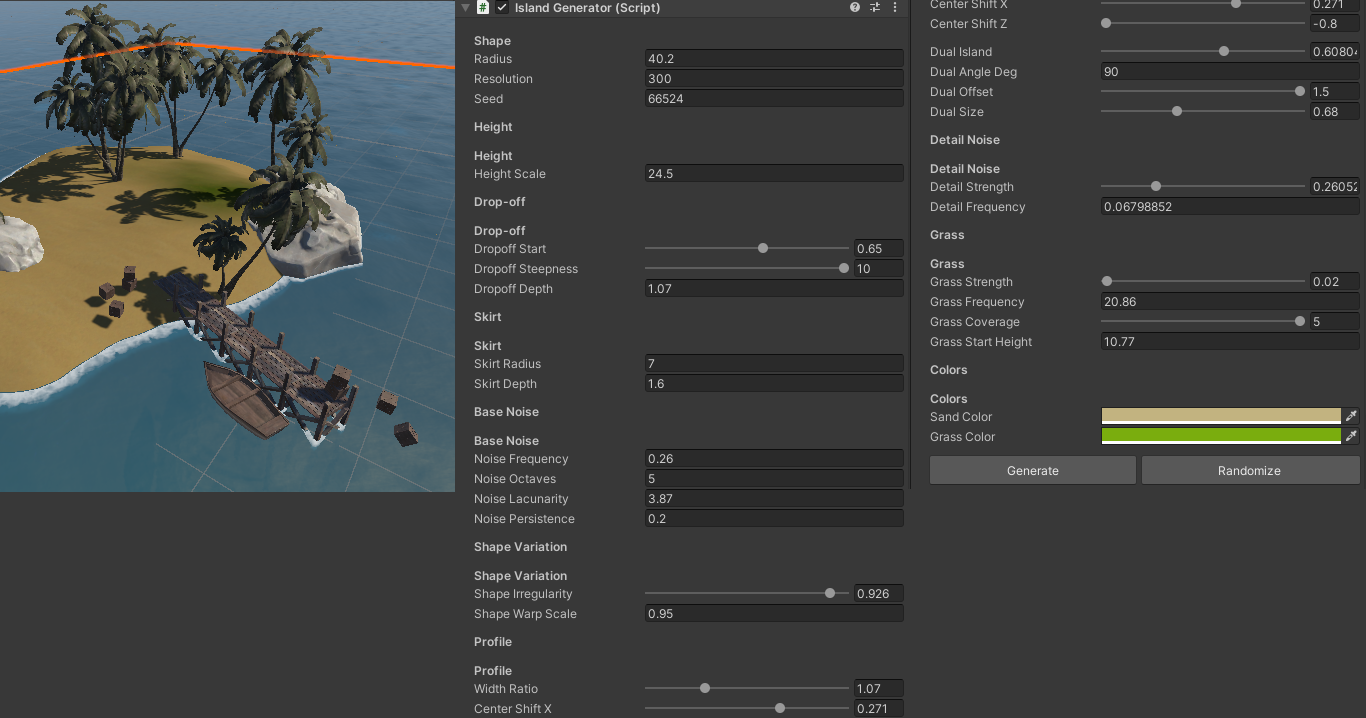
Bonus tool for generating procedural terrain islands. Attach to an empty GameObject or use Tools > Simple Ocean > Island Generator (creates a new island with random settings via ContextMenu > Randomize).
| Field | Description |
|---|---|
| Radius (Shape) | Island radius in metres |
| Resolution | Mesh subdivisions |
| Seed | Random seed for terrain shape |
| Height Scale (Height) | Maximum island height |
| Dropoff Start (Drop-off) | Percentage of radius where height starts dropping (0.3–0.9) |
| Dropoff Steepness | How sharp the underwater slope is (1–10) |
| Dropoff Depth | How deep the seabed extends |
| Skirt Radius | Extra geometry radius below the drop-off |
| Skirt Depth | Vertical depth of the skirt geometry |
| Noise Frequency (Base Noise) | Base noise frequency |
| Noise Octaves | Number of noise octaves |
| Noise Lacunarity | Frequency multiplier per octave |
| Noise Persistence | Amplitude multiplier per octave |
| Shape Irregularity (Shape Variation) | Irregularity of the island outline (0–1) |
| Shape Warp Scale | Warp scale for outline distortion |
| Width Ratio (Profile) | Width/height ratio of the island (0.3–3) |
| Center Shift X | Offset the island centre along X (−0.8–0.8) |
| Center Shift Z | Offset the island centre along Z (−0.8–0.8) |
| Dual Island | Blend amount for a second overlapping island (0–1) |
| Dual Angle Deg | Rotation angle of the second island |
| Dual Offset | Offset distance of the second island (0–1.5) |
| Dual Size | Size multiplier for the second island (0.2–1.5) |
| Detail Strength (Detail Noise) | Detail noise amplitude (0–1) |
| Detail Frequency | Detail noise frequency |
| Grass Strength (Grass) | Grass vertex-colour strength (0–3) |
| Grass Frequency | Grass noise frequency |
| Grass Coverage | Grass coverage threshold (0–5) |
| Grass Start Height | Minimum height for grass |
| Sand Color (Colors) | Sand vertex colour |
| Grass Color | Grass vertex colour |
The island mesh generates automatically in Start() and re-generates on any inspector change via OnValidate. Right-click the component header and choose Randomize for new random terrain.
OceanItemTelemetry
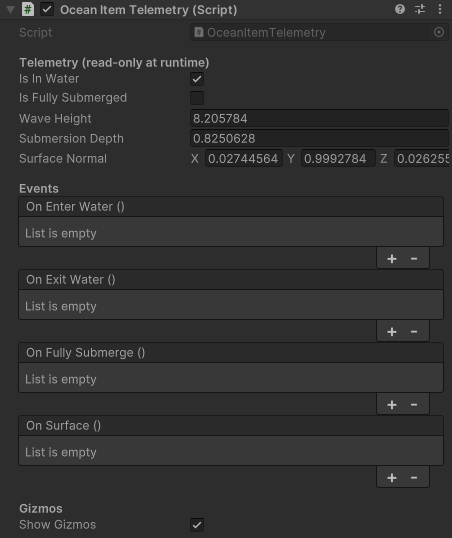
Attach to any object to monitor water interaction and fire UnityEvents on state changes.
| Section | Fields |
|---|---|
| Telemetry (read-only) | Is In Water, Is Fully Submerged, Wave Height, Submersion Depth, Surface Normal |
| Events | On Enter Water, On Exit Water, On Fully Submerge, On Surface |
| Gizmos | Show Gizmos — toggle debug visualization |
Read-only properties accessible from scripts: IsInWater, IsFullySubmerged, WaveHeight, SubmersionDepth, SurfaceNormal.
UnderwaterURPFeature (URP only)
A ScriptableRendererFeature that defines the UnderwaterCompositePass used by the underwater effect. It does not need to be added to the URP Renderer asset — injection happens at runtime via reflection in OnBeginCameraRendering. The pass renders a full-screen quad with the composite material (Hidden/UnderwaterEffectURP) after post-processing, using RenderTexture.GetTemporary for _MainTex and MaterialPropertyBlock for parameter binding.
Tools Menu
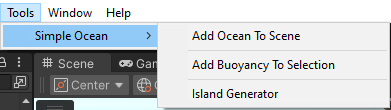
| Menu Item | Description |
|---|---|
| Tools > Simple Ocean > Add Ocean To Scene | Creates a GameObject with OceanRenderer + Shallows preset in the current scene |
| Tools > Simple Ocean > Add Buoyancy To Selection | Adds WaterBuoyancy (and Rigidbody if missing) to all selected GameObjects |
| Tools > Simple Ocean > Island Generator | Creates an "Island" GameObject with IslandGenerator + randomize on the new component |
Wave Presets
Available in the OceanRenderer inspector under Wave & Visual Presets:
| Category | Presets |
|---|---|
| Calm | Still, River |
| Rough | Ocean, Swell |
| Depths | Lake, Deep Ocean, Shallows |
| Artistic | Stylized, Toon, Tropical |
| Murky | Foggy Lake, Murky Ocean, Swamp |
| Extra | Rough Ocean, Mirror, Pool |
Each preset sets the 4 Gerstner waves and the material properties (water color, foam, specular, SSS, etc.).
Enabling Caustics
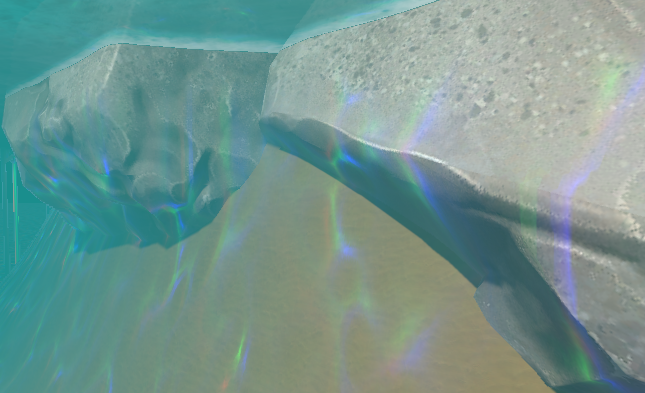
- Select your ocean GameObject in the Hierarchy
- In the OceanRenderer inspector, scroll to the Addons section
- Click Add Caustics Projector Component
- The
CausticsProjectorcomponent appears and automatically activates caustics on the water surface and enablesUnderwaterEffect.enableCaustics - Toggle
Enable Causticson the CausticsProjector to control all caustics
Performance Tips
- Mesh Resolution: 16–32 is a good range. Higher values add detail but cost vertices.
- Max Depth: 5–7 is typical. Going above 8 generates many tiles near the camera.
- Subdivision Threshold: Higher values = more quality. Lower = faster.
- Root Grid Size: 3–5 covers the visible area. 7 is very generous.
- Performance Preset: Mobile, Desktop, or Ultra — controls mesh resolution, max depth, and bump noise quality.
Requirements
- Unity 2021.3 or later
- Built-in Render Pipeline or URP 12+
- URP projects must have the
UniversalRenderPipelineAssetassigned in Graphics Settings
Support
- Documentation: https://dylanauty.com/documentation/simple-ocean/
- Asset Store page for questions and feature requests
Simple Ocean includes the Island Generator as a bonus tool for creating procedural terrain islands.