 Dylan Auty
 Component Reference
OffroadVehicle
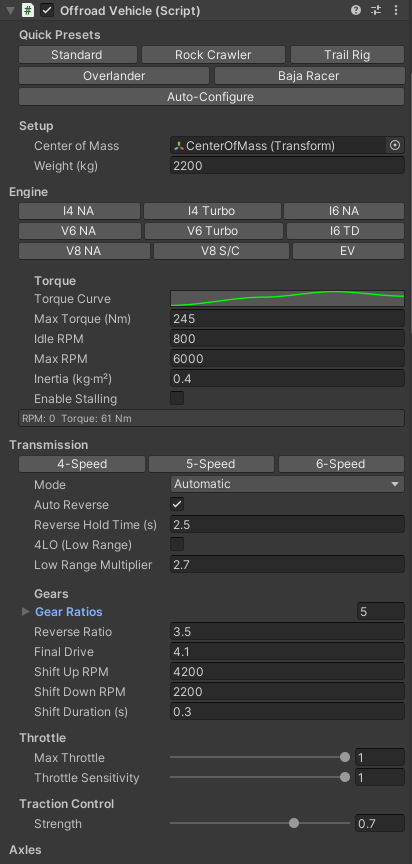
The main controller. Orchestrates all vehicle subsystems: engine, transmission, axles, brakes, aerodynamics, and parking hold. Auto-discovers child SolidAxle components and adds an OffroadInputSystem if no OffroadInput exists.
Setup
| Property | Description |
|---|---|
| Center of Mass | Transform for rigidbody center of mass position (auto-created by wizard) |
Weight
| Property | Description |
|---|---|
| Weight (kg) | Vehicle mass in kilograms |
Drivetrain
| Property | Description |
|---|---|
| Engine | Serialized OffroadEngine — torque curve, RPM limits, inertia |
| Transmission | Serialized OffroadTransmission — gear ratios, shift points |
| Transmission Mode | Automatic or Manual |
| Auto Reverse | Hold brake at standstill to toggle reverse direction |
| Reverse Hold Time (s) | Seconds to hold brake before engaging reverse |
| 4LO (Low Range) | Toggle low-range transfer case (multiplies torque by lowRangeMultiplier) |
Throttle
| Property | Description |
|---|---|
| Max Throttle | Clamps input throttle (0–1). Set to 0.3–0.5 for keyboard demos. |
| Throttle Sensitivity | 0–1. Lower values ramp throttle buildup slower on key hold. 1 = instant (current behavior). Useful for keyboard — tap throttle for a gentle blip, hold for full power. |
Traction Control
| Property | Description |
|---|---|
| Strength | 0–1. Reduces drive torque based on average axle slip. 0 = off, 1 = aggressive cut to 20% torque at full slip. |
Brakes
| Property | Description |
|---|---|
| Brake Torque (N·m) | Maximum brake torque applied per wheel |
| E-Brake Torque (N·m) | Handbrake torque applied to non-steered axles |
Parking Hold
| Property | Description |
|---|---|
| Parking Hold | Auto-brake at low speed to prevent rolling |
| Speed Threshold (m/s) | Speed below which parking hold engages |
| Hold Force (N) | Force applied to hold the vehicle stationary |
Stationary Stabilizer
| Property | Description |
|---|---|
| Enabled | Toggle standstill jitter elimination |
| Speed Threshold (m/s) | Speed below which stabilization engages (0.2 default) |
| Angular Threshold (rad/s) | Angular velocity below which stabilization engages (0.3 default) |
| Grace Time (s) | Time below the thresholds before engaging (0.2 default). Hysteresis prevents false triggers during slow drifts. |
| Blend Speed | How fast stabilization blends in/out (6 default) |
While engaged, the stabilizer damps residual velocity and angular velocity, and gently snaps the last epsilon to zero. Any input immediately releases it. It never activates above the thresholds or while airborne — crawling feel is untouched.
Runtime Properties
| Property | Description |
|---|---|
| IsStabilized | Whether the vehicle is currently stabilized |
| StabilizeBlend | 0–1 blend of the stabilization force |
Aerodynamics
| Property | Description |
|---|---|
| Drag Coefficient | Air resistance multiplier: F = v² × dragCoeff × 0.5 |
| Downforce Coefficient | Vertical grip force at speed: F_down = v² × downforceCoeff × 0.5 |
Axles
Child SolidAxle components are auto-discovered and displayed through the inspector. See SolidAxle section.
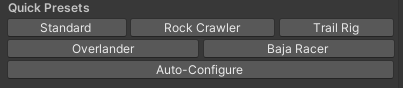
Quick Presets
One-click buttons for vehicle-wide configuration:
| Preset | Weight | Engine | Gears | Suspension | Diff | TC |
|---|---|---|---|---|---|---|
| Rock Crawler | 2,400 kg | 600 Nm V8 | 5.5 / 3.5 / 2.2 / 1.5 / 1.0 × 5.3 (×2.0 LO) | 0.6m ride, 0.5m travel, 42k spring | Locked | 0.8 |
| Trail Rig | 2,000 kg | 450 Nm V6 | 5.0 / 2.8 / 1.8 / 1.3 / 1.0 × 4.1 (×2.0 LO) | 0.5m ride, 0.36m travel, 49k spring | LimitedSlip | 0.7 |
| Overlander | 3,200 kg | 650 Nm I6 | 5.0 / 3.0 / 2.0 / 1.4 / 1.0 × 4.5 (×2.0 LO) | 0.55m ride, 0.4m travel, 70k spring | Locked | 0.6 |
| Baja Racer | 1,800 kg | 500 Nm V6 | 4.0 / 2.2 / 1.6 / 1.2 / 0.9 × 3.7 (×2.0 LO) | 0.6m ride, 0.6m travel, 26k spring | Open | 0.3 |
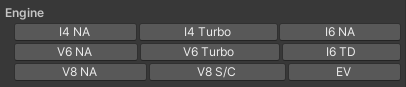
Engine Presets (Quick Buttons)
| Preset | Max Torque | Max RPM | Idle RPM | Torque Curve Shape |
|---|---|---|---|---|
| V8 | 650 Nm | 5,500 | 750 | 60% at idle, peak at 20%, 65% at redline — diesel-like |
| V6 | 500 Nm | 6,500 | 800 | 30% at idle, builds to 80%, peak at 60%, 75% at redline |
| I4 | 400 Nm | 7,500 | 850 | 15% at idle, 40% at 30%, peaks at 70%, 100% at redline |
| I6 | 550 Nm | 6,000 | 800 | 40% at idle, 85% at 25%, peak at 55%, 85% at redline |

Transmission Presets (Quick Buttons)
| Preset | Gear Ratios | Final Drive |
|---|---|---|
| 4-Speed | 4.0 / 2.5 / 1.7 / 1.0 | 4.1 |
| 5-Speed | 4.0 / 2.5 / 1.7 / 1.2 / 0.9 | 4.1 |
| 6-Speed | 4.0 / 2.5 / 1.7 / 1.3 / 1.0 / 0.8 | 3.9 |
OffroadEngine
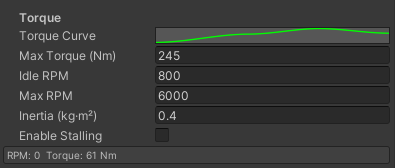
Serializable drivetrain class (not a MonoBehaviour). Configured inside the OffroadVehicle inspector. Manages torque output, RPM calculation, and engine stalling.
| Property | Description |
|---|---|
| Torque Curve | Multiplier vs normalized RPM curve. Y = 0–1, evaluated at RPM / maxRPM. |
| Max Torque (N·m) | Peak engine torque (multiplied by torque curve evaluation) |
| Idle RPM | Engine idle speed — the RPM floor when throttle is released |
| Max RPM | Engine redline — RPM is clamped to this value |
| Inertia (kg·m²) | How quickly RPM responds to load changes. Higher = slower response. |
| Enable Stalling | When enabled, engine cuts out if RPM drops below stallRPM |
| Stall RPM | RPM threshold for engine stall |
Engine Presets (5 presets, 2 rows)
| Button | Type | Torque | Weight | Character |
|---|---|---|---|---|
| Standard | I4 Turbo (2.0T) | 380 Nm | 1500 kg | Sweet-spot daily driver, balanced and responsive |
| Rock Crawler | I6 Turbo Diesel | 600 Nm | 2400 kg | Heavy, torquey, locked diffs, max traction |
| Trail Rig | V6 NA | 450 Nm | 2000 kg | All-round offroader, LSD, good suspension |
| Overlander | V8 Turbo Diesel | 650 Nm | 3200 kg | Heavy expedition rig, locked diffs, comfortable |
| Baja Racer | I4 High-Rev | 500 Nm | 1800 kg | Light, fast, sporty suspension, great for jumps |
RPM Calculation
The engine uses kinematic coupling: targetRPM = wheelRPM × totalRatio. The actual RPM rate-limits toward this target at maxRPMChangeRate (6000 RPM/s default). When the vehicle is stationary, a blend toward idle prevents stalling:
blend = clamp01(1 - kinematicRPM / idleRPM)
target = lerp(kinematicRPM, idleRPM, blend)
GetTorque()
Returns torqueCurve.Evaluate(currentRPM / maxRPM) × maxTorque.
OffroadTransmission
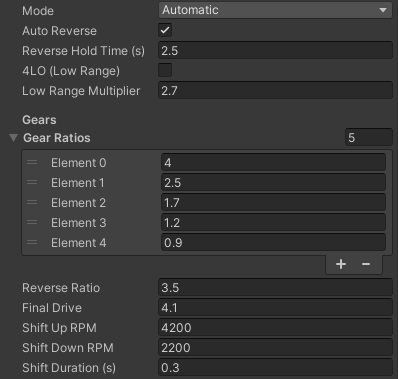
Serializable drivetrain class (not a MonoBehaviour). Manages gear ratios, shift logic, and final drive.
| Property | Description |
|---|---|
| Gear Ratios | Array of forward gear ratios (gear 0 = 1st, descending to ~0.8 for overdrive) |
| Reverse Ratio | Reverse gear ratio |
| Final Drive | Differential/final drive ratio multiplier |
| Low Range Multiplier | Torque multiplier when 4LO is engaged |
| Shift Up RPM | Auto-transmission upshift threshold |
| Shift Down RPM | Auto-transmission downshift threshold |
| Shift Duration (s) | Time for gear change animation |
GetTotalRatio()
Returns gearRatios[currentGear] × finalDrive × (inLowRange ? lowRangeMultiplier : 1).
Shift Logic
- Upshift: when
engineRPM >= shiftUpRPM && throttle > 0.1f - Downshift: when
engineRPM <= shiftDownRPM(no throttle gate — kicks down under load) - Duration: during shift, the new gear's ratio is used immediately for kinematic RPM calculation; the engine rate-limits to the new target RPM over
shiftDurationseconds
SolidAxle
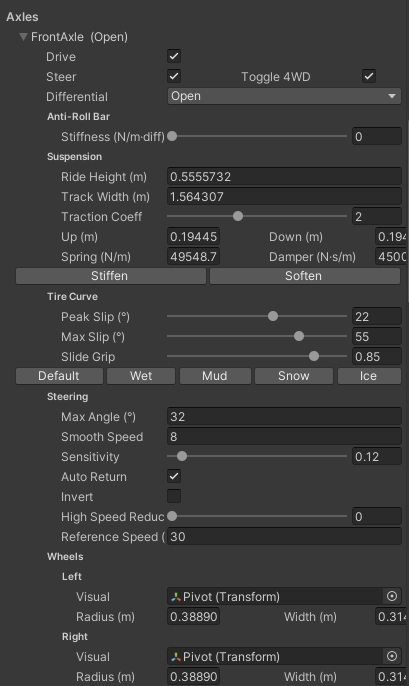
MonoBehaviour. Represents one solid (live) axle with two wheels, suspension, differential, and steering. Each axle has 4 degrees of freedom: vertical travel per wheel (independent compression/droop) and articulation (axle roll along the forward axis).
Configuration
| Property | Description |
|---|---|
| isDrive | Axle receives engine torque |
| isSteerable | Wheels on this axle respond to steering input |
| Toggle Drive | When enabled, this axle's drive can be toggled on/off via the FourWheelDrive input (4WD key) |
Suspension
| Property | Description |
|---|---|
| Ride Height (m) | Distance from axle center to wheel center at rest |
| Travel Up (m) | Maximum compression travel from rest (bump stop) |
| Travel Down (m) | Maximum droop travel from rest (full extension) |
| Spring Rate (N/m) | Suspension stiffness |
| Damper Rate (N·s/m) | Suspension damping |
Wheels
| Property | Description |
|---|---|
| Left Wheel | OffroadWheel reference |
| Right Wheel | OffroadWheel reference |
| Track Width (m) | Distance between left and right wheel centers |
| Traction Coefficient | Friction multiplier for the axle (longitudinal + lateral). Higher = more grip. Also sets the peak of the lateral force curve. |
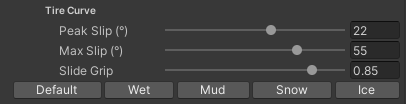
Tire Curve
| Property | Description |
|---|---|
| Peak Slip (°) | Slip angle at which lateral force peaks. Lower values = sharper initial response (grip peaks sooner). Default 12°. Street tires: 8–15°. |
| Max Slip (°) | Slip angle where grip stops falling. Wider gap between Peak and Max = more progressive breakaway. Default 35°. |
| Slide Grip | Fraction of peak grip remaining in a full slide (0.1–1). Lower = more dramatic loss of grip when drifting. Default 0.6. |
| Deadband (°) | Slip angle below which lateral force is exactly zero. Kills standstill jitter from sign flicker. Default 0.5°. |
| Relaxation (m) | Tire relaxation length — how far the tire must roll before lateral force fully builds. Higher = more lag/weight feel, lower = snappier. Default 0.5. |
| Friction Circle Sat | How much longitudinal force (throttle/brake) eats into lateral grip (0–1). 0 = no interaction, 1 = full friction circle. Default 0.9 gives ~30% lateral floor at full throttle — power-oversteer is possible but controllable. |
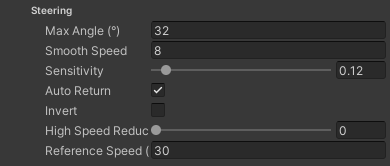
Steering (Steerable Axles)
| Property | Description |
|---|---|
| Max Steer Angle (°) | Maximum steering angle |
| Steer Smooth Speed | Base response speed for steering |
| Sensitivity | 0–2. Multiplier on steering response and lateral force buildup. Lower = slower/less twitchy, higher = snappier. |
| Auto Return | When on (default), steering returns to center when input is released. When off, steering stays at its last position (manual return). |
| Invert Steer | Flip steering direction for this axle |
| High Speed Reduction | 0–1. Reduces effective steering angle at high speed for a more forgiving arcade feel. 0 = off. |
| Reference Speed (m/s) | Speed at which High Speed Reduction reaches full effect. |
Differential
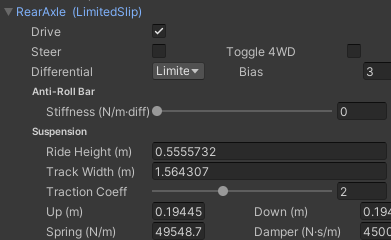
| Property | Description |
|---|---|
| Differential | Open, Locked, or LimitedSlip |
| Lock Bias | Torque bias ratio for LimitedSlip (1–5, default 3). Higher = more locking. |
Differential Models
| Type | Behavior |
|---|---|
| Open | Both wheels receive the same torque, limited by the wheel with LESS traction. Prevents wheel spin but also limits total tractive force. |
| Locked | Each wheel receives independent torque based on its own traction limit. Maximum tractive force but causes driveline binding in turns. |
| LimitedSlip | Applies a Torque Bias Ratio (TBR). When one wheel exceeds its traction, excess torque is transferred to the other wheel up to the lockBias limit. Example: lockBias=3 means a 3:1 torque split is possible. |
Anti-Roll Bar
| Property | Description |
|---|---|
| Stiffness (N/m·diff) | Anti-roll bar stiffness. Transfers load from the more-compressed wheel to the less-compressed wheel to resist body roll. 0 = off. |
Static Friction Hold
| Property | Description |
|---|---|
| Enabled | Toggle the banked-slope hold |
| Coefficient | Static friction multiplier on the axle's normal load (default 1.8). Higher = grips steeper banks. Physical limit ≈ atan(coefficient), e.g. 1.8 holds up to ~61°. |
| Speed Threshold (m/s) | Speed below which the hold is active (default 0.5). Above this, normal slip-based grip takes over. |
| Max Slope (°) | Maximum bank angle the hold supports. Beyond this the vehicle slides realistically. 0 = no limit. |
When the vehicle is near-stationary, each axle counters its load share of gravity's component along the ground plane (computed from the wheel-cast surface normals), clamped to coefficient × springLoad. This keeps the vehicle planted on banked slopes without affecting crawling behavior above the speed threshold.
The anti-roll bar applies opposing vertical forces at the spring positions proportional to the difference in suspension travel between left and right:
arbForce = (leftTravel − rightTravel) × stiffness
left spring:  +up × arbForce
right spring: −up × arbForce
When the chassis rolls (one side compresses more than the other), the bar twists and pushes up on the compressed side (reducing its load) and down on the extended side (increasing its load) — transferring load and resisting further roll.
Tuning guidance:
| Value | Effect |
|---|---|
| 0 | Off (no anti-roll bar) |
| 500 – 5,000 | Mild — reduces body lean on soft suspension |
| 5,000 – 20,000 | Moderate — noticeable roll resistance, good starting point for most vehicles |
| 20,000 – 50,000 | Aggressive — significant roll stiffness, suitable for high-performance or race-style setups |
| 50,000+ | Extreme — very stiff, may lift inside wheel in tight corners |
Tuning for handling balance (like real cars):
- Stiffer front bar → more understeer (front loses grip first when pushed)
- Stiffer rear bar → more oversteer (rear loses grip first)
- Start both axles at the same value, then bias toward the axle you want to grip more
The current ARB force is visible in telemetry (ARB=xxxN).
Wheel Cast (How Ground Detection Works)
WheelCast uses 4 rays per wheel to find the ground:
- Center vertical (primary) — straight down from the spring perch
- Left edge vertical — offset by
-right × wheelWidth × 0.5 - Right edge vertical — offset by
+right × wheelWidth × 0.5 - Forward-overlap — from the estimated wheel center, forward-down at 30°, detects step corners before the wheel reaches them
All rays use vertical height (springPos.y − hit.y − wheelRadius) for fair comparison. The ray with the smallest distance (highest ground) wins.
Runtime Properties
| Property | Description |
|---|---|
| CurrentSteerAngle (°) | Current steering angle (smooth-interpolated) |
| CurrentArticulation (°) | Axle roll angle (difference between left/right ground heights) |
| CurrentSlip | Axle-level forward slip (0 = full grip, >0 = excess torque demand / friction capacity) |
Lateral Friction (Tire Curve Model)
Each grounded wheel applies lateral force using a three-region tire curve that mimics a simplified Pacejka shape:
ratio = |slipAngle| / peakSlipAngle        (linear climb to peak)
ratio = lerp(1, slideGripRatio, t)         (gradual falloff past peak)
ratio = slideGripRatio                      (residual grip in full slide)
targetForce = sign(slipAngle) × ratio × tractionCoefficient × normalLoad
Curve regions:
| Region | Behavior |
|---|---|
|slip| ≤ peakSlipAngle |
Linear climb — force rises proportionally with slip angle |
peakSlipAngle < |slip| ≤ maxSlipAngle |
Gradual falloff — force drops from peak to slideGripRatio × peak |
|slip| > maxSlipAngle |
Residual grip — force stays at slideGripRatio × peak |
This gives three distinct tuning knobs:
- Peak Slip Angle controls where the tire reaches maximum grip — higher = more compliant before breakaway, lower = sharper initial response but earlier saturation
- Max Slip Angle controls how quickly grip falls off past peak — a wider gap between peak and max gives more progressive, predictable breakaway
- Slide Grip Ratio controls how much grip the tire retains in a full slide — lower values make drifting looser and more dramatic
Speed scaling: Lateral force is scaled by clamp(v²/ref, 0.05, 1) where ref differs per axle:
| Axle | Reference Speed | Full grip at | Purpose |
|---|---|---|---|
| Steerable (front) | 25 m²/s² | ~5 m/s (18 kph) | Progressive turn-in, prevents snap |
| Non-steerable (rear) | 4 m²/s² | ~2 m/s (7 kph) | Quick stability at low speed, prevents crawling spin-out |
Relaxation length replaces the old forceResponse rate limiter:
buildRate = max(vx / relaxationLength, 0.5) capped at 10Force builds based on how far the tire rolls, not on a fixed timer:
- At high speed (20 m/s): force reaches target in ~0.05 s — responsive but not instant
- At low speed (1 m/s): force reaches target in ~0.5 s — gradual, prevents snap-spin at parking speeds
- At standstill (0 m/s): minimum rate of 0.5/s — takes ~2 s to build, enough for a grip floor
- Force decays 2× faster than it builds for prompt straightening after release
Friction circle couples lateral and longitudinal grip. When throttle or brake is applied, the lateral grip budget shrinks:
longRatio = |longForce| / peakForce
latGripScale = sqrt(1 − clamp(longRatio, 0, frictionCircleSaturation)²)
At frictionCircleSaturation = 0.9 (default): full throttle drops lateral grip to ~30% of peak — power-oversteer is possible. At 0.6: lateral grip floor is ~80% — very stable, hard to break the rear loose. At 0 (off): longitudinal forces never affect lateral grip — arcade-style independent grip.
Force projection: The final lateral force is projected perpendicular to the vehicle's velocity so it never adds energy to the system (no acceleration from cornering forces).
Non-steered axles (rear): use pure restoring slip angle α = -atan2(vy, |vx|) with the same curve shape and relaxation model.
OffroadWheel
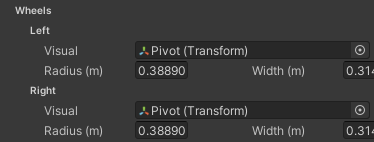
MonoBehaviour on each wheel GameObject. Handles wheel visual positioning, spin rotation, and steering rotation. No collider — all ground interaction is handled by the parent SolidAxle's raycast.
| Property | Description |
|---|---|
| Wheel Visual | The visual mesh transform. Should be under a Pivot (child of OffroadWheel) for proper spin + steer rotation. |
| Wheel Radius (m) | Radius of the wheel mesh |
| Wheel Width (m) | Width of the wheel contact patch |
Runtime Properties
| Property | Description |
|---|---|
| WheelRPM | Computed from vehicle speed: speed / (radius × 2π) × 60 |
| IsGrounded | Whether the wheel's side of the axle is in contact with the ground |
| Compression | Current suspension compression (0 = full droop, 1 = bump stop) |
OffroadEffects
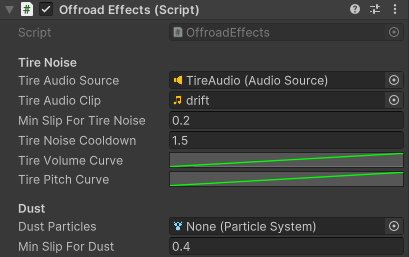
Per-wheel effects based on tire slip. Drives tire noise audio (rumble/scrub) and dust particles — designed for offroad use, no skidmarks or squeal.
Tire Noise
| Property | Description |
|---|---|
| Tire Audio Source | AudioSource for tire rumble/scrub. If left null but a clip is assigned, one is auto-created on this GameObject. |
| Tire Audio Clip | AudioClip to play when tires are working (assign here or pre-set on the AudioSource). |
| Min Slip For Noise | Slip threshold to trigger tire noise (0–1). Default 0.2. |
| Volume Curve | Volume vs normalized slip (0–1). Default: linear 0→1. |
| Pitch Curve | Pitch vs normalized slip (0–1). Default: 0.5→1.5. |
Dust (Optional)
| Property | Description |
|---|---|
| Dust Particles | ParticleSystem reference for dust clouds kicked up by slipping tires. |
| Min Slip For Dust | Slip threshold to enable dust emission. Default 0.4. |
OffroadAudio
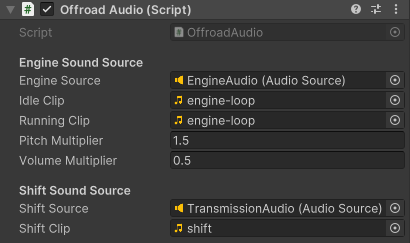
Engine and shift audio system. Blends pitch and volume of an engine AudioSource by RPM. Accepts an external AudioSource reference so the sound source can be placed at a specific position (e.g. in the engine bay).
Engine Sound Source
| Property | Description |
|---|---|
| Engine Source | AudioSource to drive with RPM-based pitch/volume. Assign an AudioSource placed at the engine position. Falls back to GetComponent<AudioSource>() if unset. |
| Idle Clip | AudioClip for the engine at idle/low RPM |
| Running Clip | AudioClip for the engine at high RPM (blends with idle clip via RPM) |
| Pitch Multiplier | Overall pitch multiplier (typical: 1.5) |
| Volume Multiplier | Overall volume multiplier (typical: 0.5) |
Shift Sound Source
| Property | Description |
|---|---|
| Shift Source | AudioSource for gear change sounds |
| Shift Clip | AudioClip played as a one-shot on each gear shift |
The shift sound triggers automatically on rising edge of transmission.IsShifting (both upshifts and downshifts).
OffroadLightManager
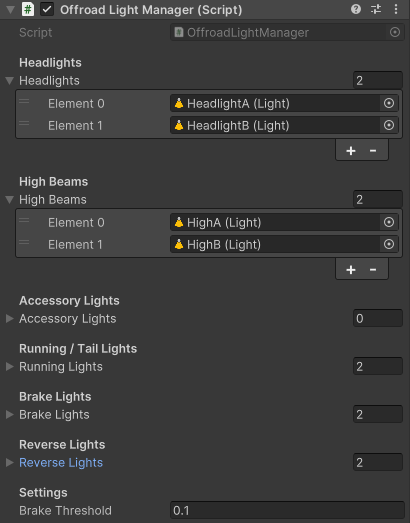
Controls a 4-state lighting cycle: Off → Main → HighBeam → Accessories → Off, cycled by the Lights input. Brake and reverse lights remain automatic.
| Property | Description |
|---|---|
| Headlights | List of Light objects for main low-beam headlights |
| High Beams | List of Light objects for high-beam headlights |
| Accessory Lights | List of Light objects (light bars, rock lights, ditch lights) |
| Running / Tail Lights | List of Light objects enabled whenever lights are on (state ≥ Main) |
| Brake Lights | List of Light objects — auto-enabled when braking |
| Reverse Lights | List of Light objects — auto-enabled when reversing |
| Brake Threshold | Minimum brake input to trigger brake lights |
Light States
| State | Headlights | High Beams | Accessories | Running / Tail |
|---|---|---|---|---|
| Off | off | off | off | off |
| Main | on | off | off | on |
| HighBeam | on | on | off | on |
| Accessories | on | off | on | on |
Access CurrentState from code to read the current lighting state.
OffroadInfo
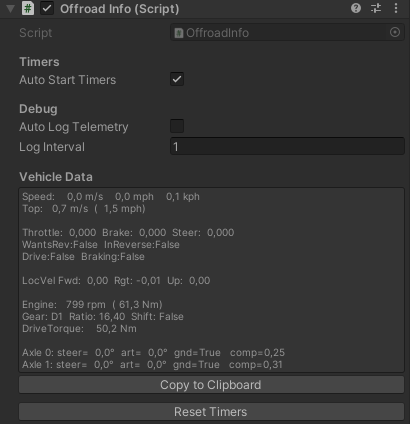
Runtime telemetry overlay. Displays real-time vehicle data in the Scene/Game view.
| Property | Description |
|---|---|
| Show Gizmo | Toggle the telemetry display |
Displayed Values:
- Speed — m/s, mph, kph with top speed tracking
- Throttle / Brake / Steer
- Engine — RPM and torque (Nm)
- Transmission — current gear, ratio, shift status
- Drive Torque
- Per-axle — steer angle, articulation, ground contact, compression
OffroadCameraController
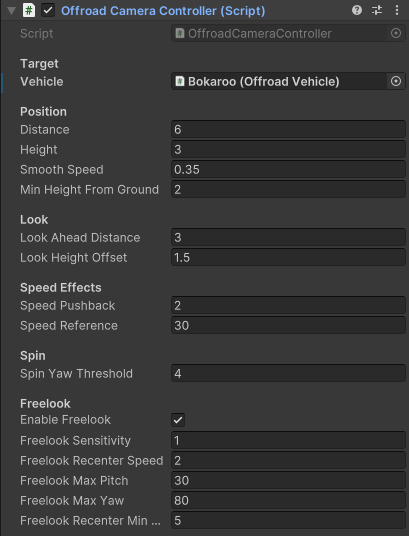
Forza-style follow camera with speed pushback, velocity look-ahead, and mouse freelook.
| Property | Description |
|---|---|
| Target | Transform to follow (assign to the vehicle body) |
| Vehicle | OffroadVehicle reference (auto-found from Target) |
| Distance (m) | Base follow distance behind the target |
| Height (m) | Height offset above the target |
| Smooth Speed | SmoothDamp time constant — lower = snappier, higher = floatier |
| Min Height From Ground (m) | Camera rises to avoid dipping below this distance from terrain |
| Look Ahead Distance (m) | How far ahead of the car the camera looks (creates sense of speed) |
| Look Height Offset (m) | Vertical offset for the look-at point |
| Speed Pushback (m) | Extra distance the camera pushes back at high speed |
| Speed Reference (m/s) | Speed at which pushback reaches full effect |
| Spin Yaw Threshold (rad/s) | Yaw rate at which the camera stops looking ahead and focuses on the car (~230°/s default). Prevents the look-at point from whipping during spins. |
| Enable Freelook | Toggle mouse freelook |
| Freelook Sensitivity | Mouse look sensitivity multiplier |
| Freelook Recenter Speed | How fast the camera recenters when driving (0 = never, 5 = instant) |
| Freelook Max Pitch (°) | Maximum vertical look angle |
| Freelook Max Yaw (°) | Maximum horizontal look angle |
Freelook behavior: Move the mouse to orbit the camera around the vehicle. When you apply throttle, steer, or brake, the camera smoothly recenters behind the car. Camera position pushes back at speed for a more dramatic sense of velocity.
Ground avoidance: Raycasts downward from the camera. When below minHeightFromGround, the camera rises to maintain the minimum ground clearance.
OffroadCameraManager
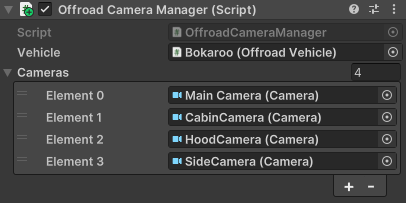
Camera switcher. Cycles through a list of cameras with the CameraSwitch input.
| Property | Description |
|---|---|
| Vehicle | OffroadVehicle reference (provides input) |
| Cameras | List of Camera objects to cycle through |
Only one camera is active at a time. Start scene with all cameras added to the list; the manager handles enable/disable and AudioListener routing.
OffroadInput
Base input class. Defines the input interface used by all input modules.
| Property | Description |
|---|---|
| Steer | -1 to 1 |
| Throttle | 0 to 1 |
| Brake | 0 to 1 |
| LowRangeToggle | Bool (toggles on press) |
| WantsReverse | Bool |
| LightsToggle | Bool (toggles on press) |
| CameraSwitch | Bool (toggles on press) |
| FourWheelDriveToggle | Bool (toggles on press) |
OffroadInputSystem
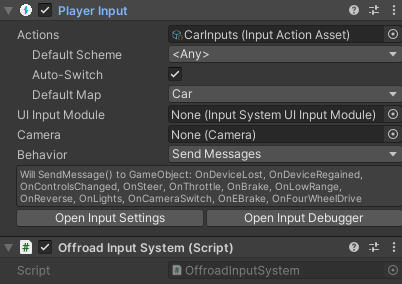
New Input System implementation. Requires the com.unity.inputsystem package.
Auto-added by OffroadVehicle.Awake() if no OffroadInput component exists. Reads from a PlayerInput component with action map Car containing:
| Action | Type |
|---|---|
| Steer | Value / Axis |
| Throttle | Value / Axis |
| Brake | Value / Axis |
| LowRange | Button |
| Reverse | Button |
| Lights | Button |
| CameraSwitch | Button |
| FourWheelDrive | Button |
OffroadInputDelegate
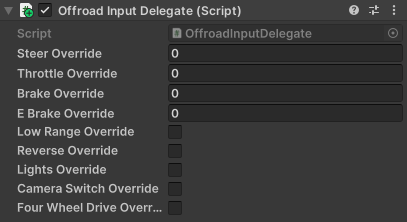
Programmatic input module. Overrides all inputs from code — useful for AI, testing, or networked vehicles.
| Property | Description |
|---|---|
| steerOverride | -1 to 1 |
| throttleOverride | 0 to 1 |
| brakeOverride | 0 to 1 |
| lowRangeOverride | Bool |
| reverseOverride | Bool |
| lightsOverride | Bool |
| cameraSwitchOverride | Bool |
| fourWheelDriveOverride | Bool |
Override values are read directly in GetInput() — no other setup required.
OffroadAIDriver
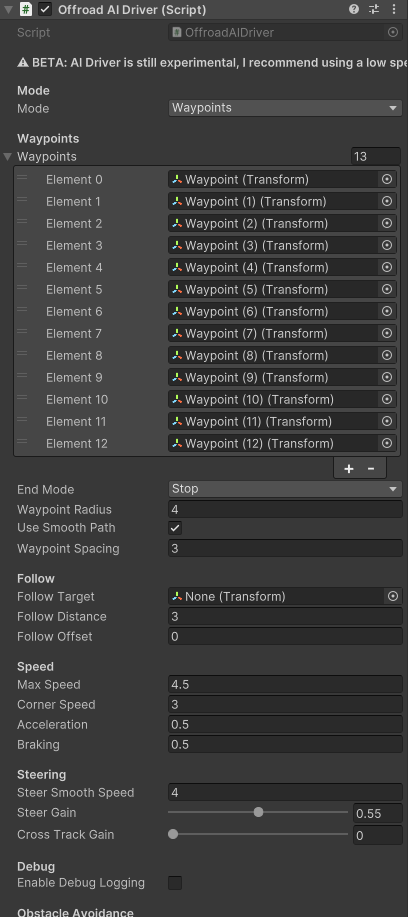
⚠ BETA: AI Driver is still experimental, I recommend using a low speed for crawling
AI driver that navigates waypoints using pure pursuit on a smooth Catmull-Rom path with curvature-based speed planning. Attach to the same GameObject as the vehicle. Disables the player's input system when active and re-enables it on disable.
Waypoints
| Property | Description |
|---|---|
| Waypoints | Array of Transform targets. Drag empty GameObjects into the scene and assign them here. |
| End Mode | Loop — restart from waypoint 0. Stop — stop at the last waypoint. Reverse — ping-pong back through the list. |
| Waypoint Reached Distance (m) | How close the car must get to count as "reached". Default 4. |
| Use Smooth Path | Interpolates waypoints into a smooth Catmull-Rom spline for natural cornering. Default on. |
| Waypoint Spacing (m) | Distance between interpolated path points. Default 3. |
You can add a waypoint at the current position using right-click > OffroadAIDriver > Add Waypoint At Current Position in the inspector context menu. The smooth path auto-rebuilds when waypoints are moved in the editor.
Speed
| Property | Description |
|---|---|
| Max Speed (m/s) | Desired cruising speed on straight sections. Default 12. |
| Corner Speed (m/s) | Target speed through tight corners. Default 5. |
| Acceleration | Throttle output when under target speed (0–1). Default 0.5. |
| Braking | Brake output when overspeeding (0–1). Default 0.5. |
The AI scans path curvature ahead and behind the closest point, braking into corners and accelerating on exit. Speed transitions are rate-limited for smooth behavior.
Steering
| Property | Description |
|---|---|
| Steer Smooth Speed | How fast the AI's steering value smooths. Lower = smoother but slower response. Default 4. |
| Steer Gain | How aggressively the AI steers toward the lookahead point. Default 0.55. |
The AI uses pure pursuit — it picks a point ~12m (+ 0.5s of travel) ahead on the smooth path and steers toward it. No cross-track error correction.
Obstacle Avoidance
| Property | Description |
|---|---|
| Enable Avoidance | Toggle obstacle avoidance rays. Off by default. |
| Detect Distance (m) | Max ray distance. Default 20. |
| Stop Distance (m) | Distance below which the car stops. Default 6. |
| Obstacle Mask | Physics layers the rays detect. Default Everything. |
When enabled, 5 rays fan out (-16°, -6°, 0°, 6°, 16°) and the closest obstacle reduces the speed target. Ray origin is offset 1.5m forward + 0.5m up to prevent self-collision.
Config
| Property | Description |
|---|---|
| Use Four Wheel Drive | Enables 4WD on start. Default on. |
| Use Low Range | Enables 4LO for low-range crawling. Default off. |
| Use E-Brake | Applies handbrake when steering is near max and speed is high. Default off. |
State
| Property | Description |
|---|---|
| Is Active | Enable/disable AI control. When disabled, player input is restored. |
| Draw Gizmos | Visualize waypoints (green = target, cyan = others), smooth path (green line), and obstacle rays (green = clear, red = blocked). |
Runtime Behavior
- On enable: disables
OffroadInputSystem, activates 4WD - On disable: re-enables player input, zeroes all inputs
- The smooth path is auto-rebuilt in edit mode when waypoints move; in play mode it is built once on start
- Speed is rate-limited so throttle/brake transitions are smooth
- The AI respects 4WD and low range through the vehicle's own settings